
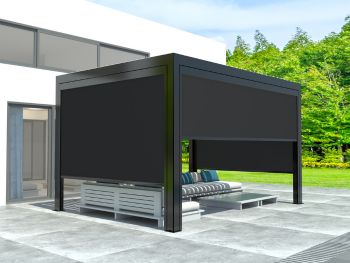
Integrating Zip Screens with Your Home Automation System
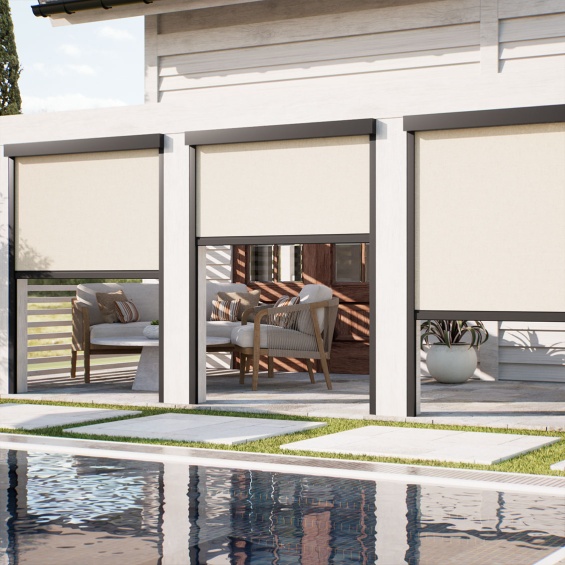
Zip screens integrate with home automation systems by connecting their motorized drives to a smart hub, which then triggers opening and closing based on schedules, sunlight sensors, temperature thresholds, or direct commands from a phone or voice assistant. Once configured correctly, the screens respond to actual outdoor conditions throughout the day rather than sitting in whatever position someone last left them.
That last part matters more than it sounds. Most homeowners with manual outdoor blinds end up adjusting them inconsistently. The screens close for a few days when the afternoon heat gets bad, then stay in that position for a week after the weather shifts, or get left open through a hot afternoon because nobody’s home to close them. Automation removes the habit from the equation entirely.
Why Zip Screens Work Better with Automation Than Standard Outdoor Blinds
Not every outdoor blind is suitable for motorized automation. Standard roller blinds that hang freely can flap in wind and occasionally slip off their guides during automated movement – which creates operational problems and shortens the life of the mechanism. Zip screens are designed differently.
The defining feature of a zip screen is its tensioned side-track system. The fabric edges run inside aluminium channels on both sides, keeping the screen taut and predictable regardless of wind conditions. That structural stability is what makes zip screens genuinely suited to automated control: the motor moves the fabric along the same path every single time, with no catching, flapping, or misalignment to trigger mid-cycle.
A standard outdoor blind in the same frame might work fine manually but resist automation across anything beyond very light conditions.
| Feature | Standard Outdoor Blinds | Zip Screens |
| Wind behaviour | Can flap or detach from guides | Stays taut due to tensioned side tracks |
| Reliability of motorized movement | Variable | Consistent – same path every cycle |
| Automation compatibility | Limited | High – designed for motorized control |
| Typical application | Light shading | Full enclosure, climate and privacy control |
How the Integration Process Works Step by Step
Connecting motorized zip screens to a home automation system is a one-time setup that most homeowners can manage themselves for basic scheduling, though more complex integrations with sensors and existing smart home platforms typically benefit from professional configuration.
The process generally runs in four stages. First, the screens need to be motorized rather than hand-cranked, this is either specified at installation or retrofitted onto existing tracks that can accommodate a motor. Second, the motors are connected to a smart home hub or controller, either through a wired connection or via a wireless protocol such as Z-Wave, Zigbee, or RF. Third, the hub links to an app or voice assistant interface so the screens can be controlled manually from anywhere. Fourth, automated triggers are configured – which is where the real day-to-day value comes in.
For a south-facing terrace in Dubai, a practical setup might close the screens at 11 AM when the sun angle makes glare significant, partially open them at 3 PM when direct sun shifts away, and open fully by 6 PM for evening use. That same adjustment done manually every day is a habit that most people abandon within a month.
Why Dubai Homes Benefit from This More Than Most
Dubai’s outdoor climate creates a specific problem that automated shading addresses better than most alternatives. The city’s peak heat period runs from late May through September, with outdoor temperatures regularly exceeding 42°C and direct sun exposure that makes glass-facing rooms uncomfortable even with air conditioning running continuously.
Screens that respond to actual sun position, rather than a fixed daily schedule, reduce heat gain through glass significantly during those peak hours. That reduction in heat load translates into measurable air conditioning savings. Research on external shading in hot-arid climates consistently puts the cooling load reduction between 15 and 30 percent for well-positioned external shading during peak summer months, though exact figures depend on window orientation, glazing type, and how well the screening covers the glass area.
Automated zip screens for smart homes in Dubai also address the occupancy gap: many households in the UAE combine long working hours with domestic staff who may not have clear instructions on when to adjust outdoor shading. An automated system closes when it should and opens when conditions allow, regardless of who’s home.
The Four Most Useful Automation Triggers for Zip Screens
Time-based schedules are the simplest starting point. Most systems let you set specific times for screens to open or close on weekdays versus weekends, and adjust those schedules seasonally. The limitation is that fixed times don’t account for overcast days when natural light drops and shading isn’t needed as early.
Sunlight sensors overcome that limitation by measuring actual light intensity in real time. A lux sensor placed on the building’s exterior can trigger screens when sunlight exceeds a set threshold, say, 30,000 lux, which corresponds roughly to direct midday sun and retract them once the reading drops below that level. This approach avoids unnecessary closure on cloudy days and adjusts dynamically when cloud cover changes.
Temperature triggers work well for spaces used primarily in the evening. A screen can be set to open automatically once the outdoor temperature drops below 32°C, indicating that sitting outside has become comfortable. Some setups pair indoor temperature sensors with outdoor screens, closing the screens when indoor air conditioning load spikes past a certain point.
Remote app control functions as the manual override for all of the above. App-based control for zip screens in UAE smart homes allows the homeowner to adjust any screen from anywhere, useful when plans change and the automated schedule no longer fits what’s actually happening at home.
What to Check Before the Zip Screen Installation Begins
Getting the technical prep right before installation avoids a common problem, discovering that the motor protocol isn’t compatible with the existing smart hub, which means either replacing the hub or replacing the motors.
A few things worth confirming ahead of time:
- The chosen motor’s wireless protocol matches the home automation platform already in place. Somfy motors, for example, use RTS or IO protocols; KNX-based systems need KNX-compatible actuators; other systems use Zigbee or Z-Wave. Mixing protocols requires a bridge that adds cost and occasionally introduces reliability issues.
- Power supply to each motor location is available or planned. Motorized zip screens need a permanent power source at the motor housing, a 240V supply for most ducted motor types. Running that cable is much easier during a renovation than after walls are finished.
- The existing smart home hub can handle the number of zones being added. A home with 8 screens on separate circuits needs a hub with enough device capacity and a clear automation logic structure.
- Outdoor-rated motors are specified if the motor housing sits in an exposed location. IP54 is the minimum for outdoor exposure; IP65 is preferable in Dubai’s coastal areas where humidity is higher.
Zip Screen Home Automation: A Pre-Installation Checklist
Working through this before engaging an installer saves time and avoids mid-project changes:
- Confirm all screens will use motorized operation – manual zip screen tracks can sometimes be retrofitted with motors, but not all track profiles accept every motor type
- Check the wireless protocol of the chosen motor against the existing smart home platform
- Identify power supply points for each motor – plan cabling routes during any associated building works
- Decide which triggers matter most: time-schedule, sunlight sensor, temperature, or app-only
- Test the app interface on a demo or showroom setup if possible. Some platforms are significantly easier to reconfigure than others once the initial setup is done
- Allow for a commissioning period of 2 to 5 days after installation to fine-tune schedule timings and sensor thresholds
FAQ: Zip Screen Automation and Smart Home Integration
Can existing manual zip screens be converted to motorized automation?
Many existing zip screen tracks can be retrofitted with a motorized drive, provided the track profile is compatible with available motor types and there’s a power source accessible near the motor housing. An assessment of the current installation is needed before confirming this. Some older or narrower track profiles don’t accept standard retrofit motors without modification to the headbox.
Which smart home platforms are compatible with motorized zip screen systems? Compatibility depends on the motor manufacturer. Somfy motors are among the most widely supported and work with Apple HomeKit, Google Home, Amazon Alexa, KNX, and most major platforms via compatible hubs. Other motor brands use Zigbee or Z-Wave protocols that integrate with Philips Hue hubs, SmartThings, and similar controllers. Confirming protocol compatibility before specifying the motor avoids the most common integration problem.
What happens to automated zip screens during a power outage?
Most motorized zip screen systems include a manual override, typically a detachable crank handle that attaches to the motor shaft to allow hand operation when power is unavailable. The screens don’t lock in place during an outage. They simply lose their automated function until power is restored. Battery backup units exist for critical applications but are rarely standard on residential installations.
How much can automated external shading actually reduce air conditioning costs?
External shading positioned correctly on a west or south-facing facade in a hot-arid climate like Dubai can reduce solar heat gain through that elevation by 60 to 80 percent during peak sun hours, according to multiple building energy studies. The effect on total electricity bills depends on how large the glazed areas are relative to the overall building, but homes with significant west-facing glass in Dubai regularly see meaningful reductions in cooling load. Some homeowners report 20 to 25 percent lower electricity use during summer months after installing automated external shading.
Is professional installation required, or can motorized zip screens be self-installed?
The screens themselves benefit significantly from professional installation to ensure the tensioned track system is aligned correctly, a track that’s even slightly off-square causes the fabric to bind during operation. Motor integration with a smart home hub is something a technically confident homeowner can set up themselves for basic scheduling, but sensor-based automation with multiple zones benefits from professional commissioning to configure thresholds and test each zone’s response correctly.
How do sunlight sensors work with zip screen automation?
A sunlight sensor, typically a lux meter or pyranometer mounted on an exterior wall or roof, measures light intensity in real time and sends that data to the smart hub. When brightness exceeds a preset threshold (commonly 25,000 to 50,000 lux for direct sun), the hub signals the screens to close. As light drops below a lower threshold, screens retract. Most systems use two thresholds – one to trigger closing and a lower one to trigger opening, which prevents screens from cycling repeatedly during partly cloudy conditions.
Can automated zip screens be controlled when traveling abroad?
Yes, provided the smart home hub is connected to the home’s Wi-Fi network and the app has remote access enabled. App-based control for zip screens in the UAE gives full remote operation over a standard internet connection, meaning screens can be adjusted from anywhere in the world. Some systems also support geofencing, automatically opening screens when the homeowner’s phone is detected approaching the property.
Do automated zip screens work with voice assistants?
Many motorized zip screen systems integrate with Amazon Alexa, Google Assistant, and Apple Siri through compatible hubs or native app integrations. Commands like “close the terrace screens” or “open the bedroom shade” work in practice, though the exact phrasing depends on how zones are named within the smart home app. Grouping screens by location (terrace, bedroom, living room) makes voice control significantly more intuitive than assigning individual screen names.
What’s the typical lifespan of a motorized zip screen system?
The fabric canopy on a quality zip screen typically lasts 8 to 12 years with regular use before UV degradation affects performance or appearance. Motors generally outlast the fabric, with quality tubular motors rated for 30,000 to 50,000 operating cycles – at two full cycles per day, that’s 40+ years of theoretical lifespan. The electronic control components, including hub hardware and wireless receivers, have a shorter practical lifespan of around 10 to 15 years before obsolescence or firmware support ends.
Can zip screen automation integrate with outdoor sensor systems already in place?
Most modern smart home platforms allow zip screen motors to share sensor data with other connected devices. A weather station already installed for pool management, for example, can feed wind speed data to the screen automation system to trigger retraction in high-wind conditions. The feasibility depends on whether both systems use compatible protocols or whether a bridge device is needed to translate signals between them.
Get A Free Quote